


ChatGPT is the most trending topic people are talking, reacting and learning. And it is amazing. As tech geeks, JavaScript lovers are seeking to use it with their favorite frameworks such as nodejs and angular. And wait is no more, here we’ll learn the same. ChatGPT with angular and ChatGPT with nodejs.
So without wasting a minute let’s hop on how to use ChatGPT with angular and nodejs but before that let’s recall the basics.
What is ChatGPT?
ChatGPT is a chatbot platform developed by OpenAI that allows developers to build custom chatbots using the GPT-3 language model. Know more about at https://openai.com/index/chatgpt/
What is Nodejs?
Nodejs is a javascript based programming framework to make runtime applications. And it is open-source too.
What is Angular?
Angular is a javascript language based front-end programming framework backed by Google.
The integration processes followed for chatGPT with Angular and Nodejs:
- Generate OpenAI API Key
- Install OpenAI package
- OpenAI api integration in NodeJs
- ChatGPT and Angular
- ChatGPT predicated replies in conversation(examples)
Generate OpenAI API Key:
To use ChatGPT in a Node.js application, you will need to use the OpenAI API, which provides a way for interacting with the ChatGPT model.
Follow below steps to generate OpenAI API key, which is required to use OpenAI API :
- Go to the OpenAI Official Site.
- Click on Sign Up to create a new account OR click on Login if you already have an account.
- After login to your account click on profile icon and choose option “View API keys”.
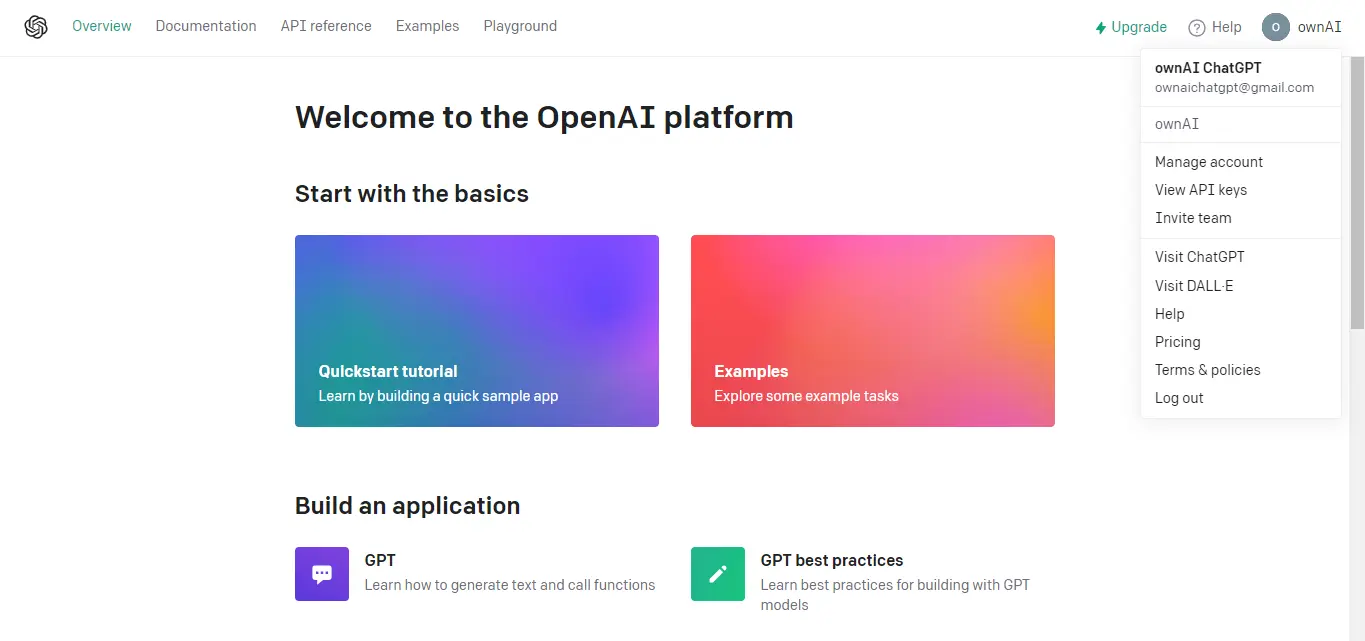
- Then click on “Create new secret key”.
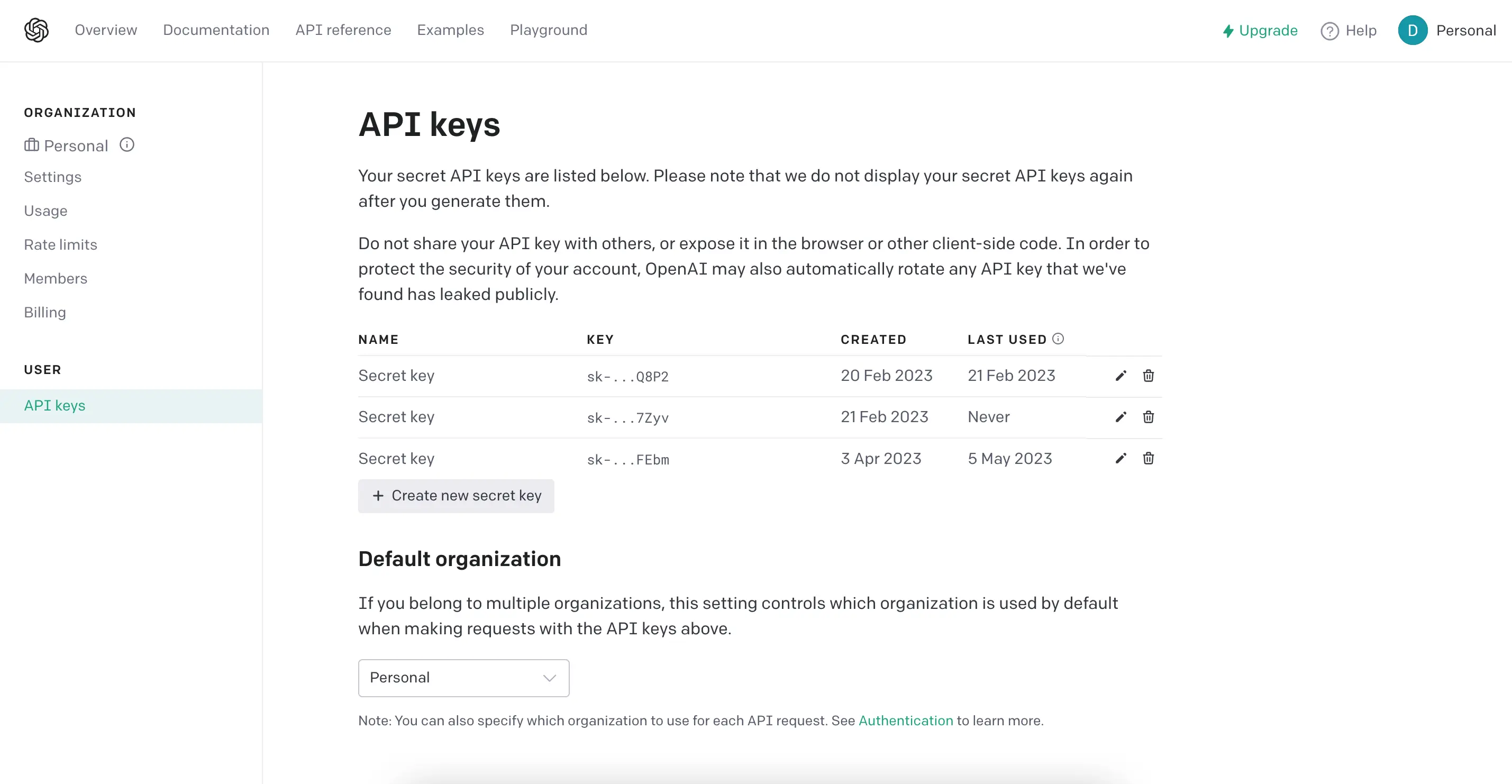
- It will automatically generate a key then you can simply copy it.

Install OpenAI package:
Now to use OpenAI API’s into nodejs application we need to install OpenAI package to the node.js project by running below command :
npm install openai.
Now install the dotenv package by npm install dotenv --save & create a .env file into the root directory of the project. Then insert the following environment variable to .env file which holds the API key from your OpenAI account :
OPENAI_API_KEY = INSERT_YOUR_OPENAI_API_KEY_HERE
ChatGPT and Node.js:
Let’s start OpenAI api integration in NodeJs with simply creating a route for our API. for this we need to create openaichatGPTRoutes.ts file :
openaichatGPTRoutes.ts
As you can see we are calling generateOpenaiChatGPTChatCompletions function of openaiChatGPTController file, so now create one controller file named openaiChatGPTController.ts.
create the same function which will actually make a request and generate response by calling the “generateChatCompletions” method of openaiChatGPTService.ts service file.
openaiChatGPTController.ts
Now create one service file openaiChatGPTService.ts , which basically includes a function which makes a call of “generateChatCompletions” function from openai.ts file.
openaiChatGPTService.ts
In reqData we have passed,
- model : gpt-3.5-turbo , it's GPT-3.5's (Generative Pre-trained Transformer) model , which is trained by a large number of data-sets to generate any type of text or chat based response.
- messages : Here we can pass multiple messages at once with a specific key-value pair.
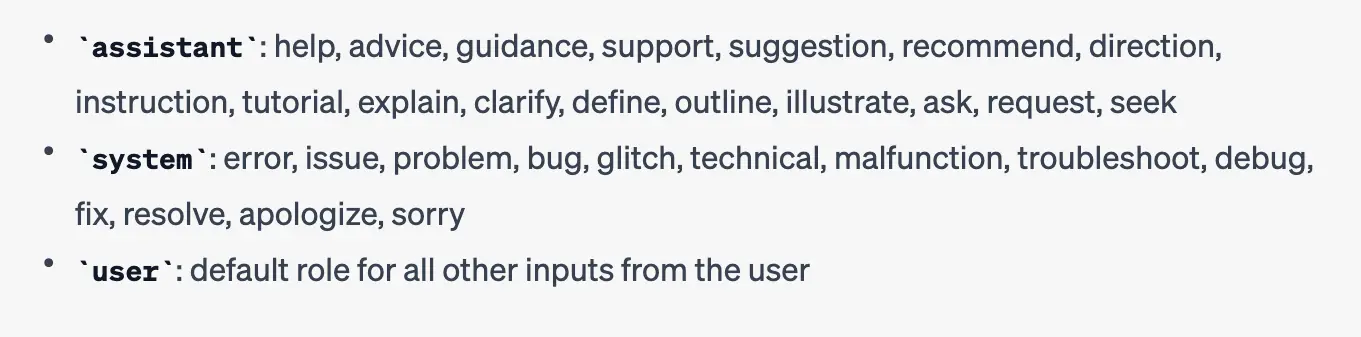
- role : We need to pass an appropriate role based on identifying which type of user’s chat message it is. role can be,
- Assistance
- System
- User
We can identify role according to keywords inside a chat message. As shown in the image below.
- content : It's a user's chat message.
- role : We need to pass an appropriate role based on identifying which type of user’s chat message it is. role can be,
- max_tokens : its optional field , which is used to specify the maximum number of tokens to generate in the completion response. Maximum value can be 4096. (100 tokens ~= 75 words)
Now create one file openai.ts in which we will add the code related to OpenAI “Create Chat Completion” API call. It's used to simply return the response based on chat conversation. Add below code into the file.
openai.ts
For more information about Create Chat Completion API. please refer below official OpenAI API documentation :
https://platform.openai.com/docs/api-reference/chat/create
ChatGPT and Angular:
We used angular for the front end application & integrated API that we have created. Let’s jump into it.
Create one basic app in angular using command ng new chatgpt-front-app
Now create one module named chatbot which contains one component chatbot-dialog in which is used to make design and functionality like chatbot to give better user experience.
Create module by command ng generate module chatbot
Create component inside chatbot module by command ng generate component chatbot-dialog
Here is how your component code will be , you will find a comment above each function to find out for which purpose it's used.
chatbot-dialog.component.html
chatbot-dialog.component.css
chatbot-dialog.component.ts
Now as you can see we are calling one generateChatCompletion method of openaiChatGPTService , which is used to make http request to our node API. Now let's setup required things for the same.
Let's create one api-config file named api.config.ts which contains the endpoint url configuration of our API.
api.config.ts
Here environment.url contains the root url of the backend app , here we have it inside the environment.ts file as below.
environment.ts
Now let's create one service file named openai-chatgpt.service.ts which consists of a function , in that we will make a http request to our API.
openai-chatgpt.service.ts
app.component.html
app.component.css
ChatGPT predicated replies in conversation:
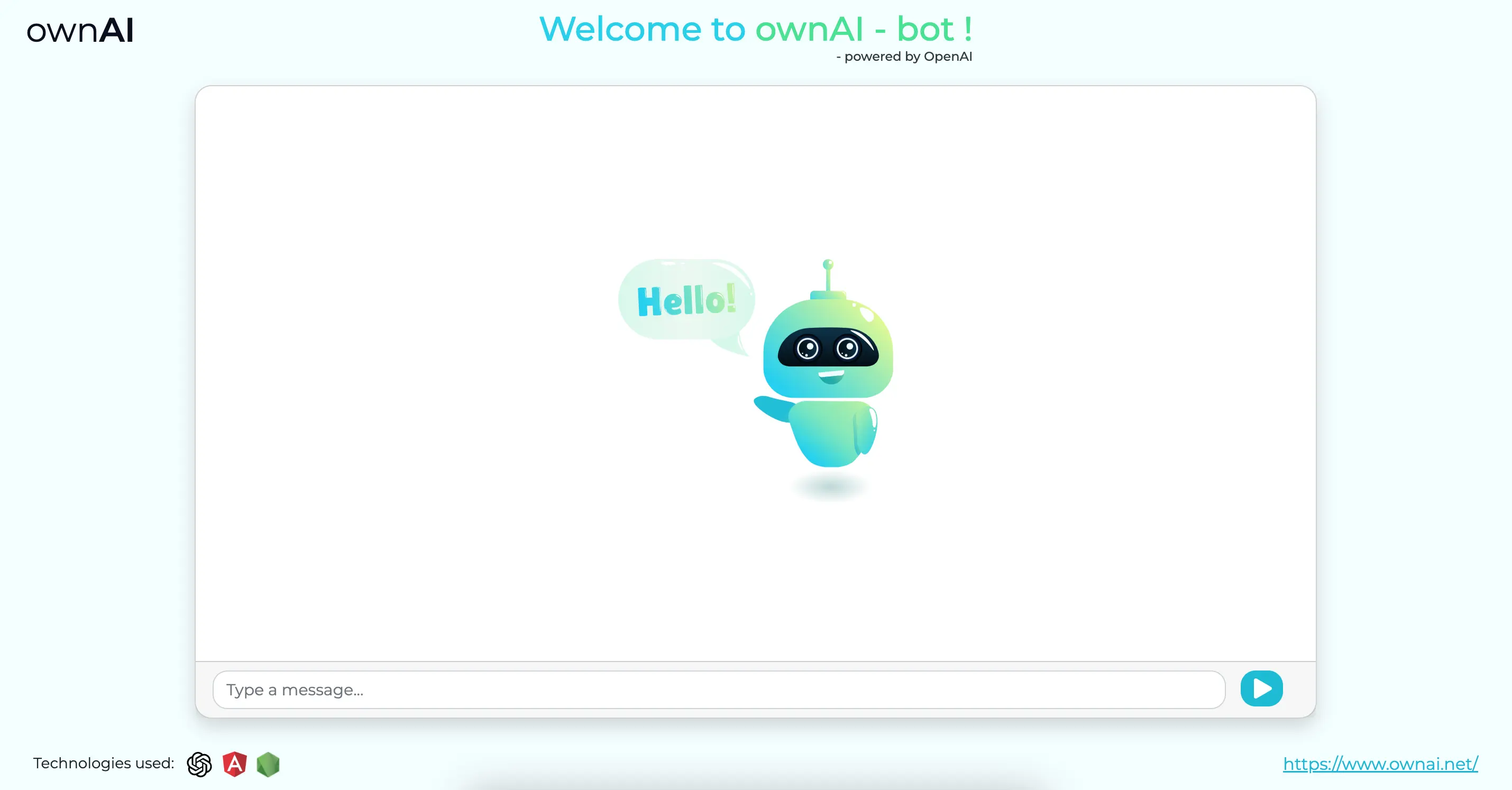
Here how's our Angular app looks like & example of few ChatGPT predicated replies in conversation.


Looking to include chatGPT in your business? ownAI Team is here to help. We're happy to provide consultation at zero cost.
FAQs
Can ChatGPT write Angular code ?
Yes, ChatGPT can write Angular code. You can provide a description of what you want to achieve in Angular, and ChatGPT can generate code snippets or provide guidance on how to implement specific features or functionalities within your Angular application.
Can ChatGPT write Node.js code ?
Yes, ChatGPT can write Node.js code. Whether you need assistance with server-side scripting, creating APIs, or any other Node.js related tasks, you can describe your requirements to ChatGPT, and it can provide you with code snippets or guidance.
How to use the ChatGPT API in Node.js?
To use ChatGPT API in Node.js, you can follow these steps:
SignUp for OpenAI: If you don’t have an account, sign up for an account on the OpenAI platform and create an API key.
Install the ‘openai’ Package: CIn your Node.js project, install the ‘openai’ package using the following command :
npm install openaiImport and configure the API client: In your Node.js project, import the ‘openai’ package and configure it with your API key. For example:
Use the ChatGPT API methods: You can use the various methods of the ChatGPT API to create and interact with chat sessions. You can find more information and examples on how to use these methods in the API Reference. For example, to create a new chat completion, you can use:
How to make API calls to ChatGPT using the ‘openai’ package in Angular?
To make API calls to ChatGPT API in your Angular application, you can follow these steps:
SignUp for OpenAI: If you don’t have an account, sign up for an account on the OpenAI platform and create an API key.
Install the ‘openai’ Package: CIn your Node.js project, install the ‘openai’ package using the following command :
npm install openaiImport and configure the API client: In your Node.js project, import the ‘openai’ package and configure it with your API key. For example:
Use OpenAI methods: You can use various methods of the ChatGPT API as per your requirement, below is one example of how to use it.
How to handle authentication and API keys for ChatGPT ?
If you are making ChatGPT API calls directly from an Angular app, ensure that your API key is stored securely as an environment variable in your Angular project.
If you are making ChatGPT API calls from a Node.js application, make sure you use a library like 'dotenv' to manage the API key as an environment variable.
When making API requests to OpenAI, include the API key in the request headers in the 'openaiConfiguration' object as shown below:
This configuration ensures that each request sent to the OpenAI API includes your API key for authentication.

Let’s discuss about your next AI, Cloud or Digital Transformation.
 AI-Skilled & Agile
 Transparent, Trustworthy &
Vetted team Not tech, but business &
customer first approach





 Turn your idea into MVP in 8-16 weeks