



Cloud computing refers to the practice of accessing and using remote computer resources, such as those provided by an online provider. Since the advent of cloud computing, there has been a meteoric rise in the number of cloud-based IT applications and services.
In 2024, practically all of the software we use, no matter how small or big, is hosted on the cloud. And there is a big reason for it.
Forbes quoted, "Cloud computing alone is a massive market expected to reach $832.1 billion by 2025 according to MarketsandMarkets".
In this article, we walk you through everything you wanted to know about cloud computing, like its definition, types, benefits, and how to transition your business into cloud computing to take advantage of it to keep thriving your business and making an impact.
What Exactly is Cloud Computing?
The term "cloud" refers to a service that allows users to rent a shared pool of computer resources as an on-demand, as-needed service through the Internet. Clouds are essentially just virtualized data centers that house server hardware and data storage.
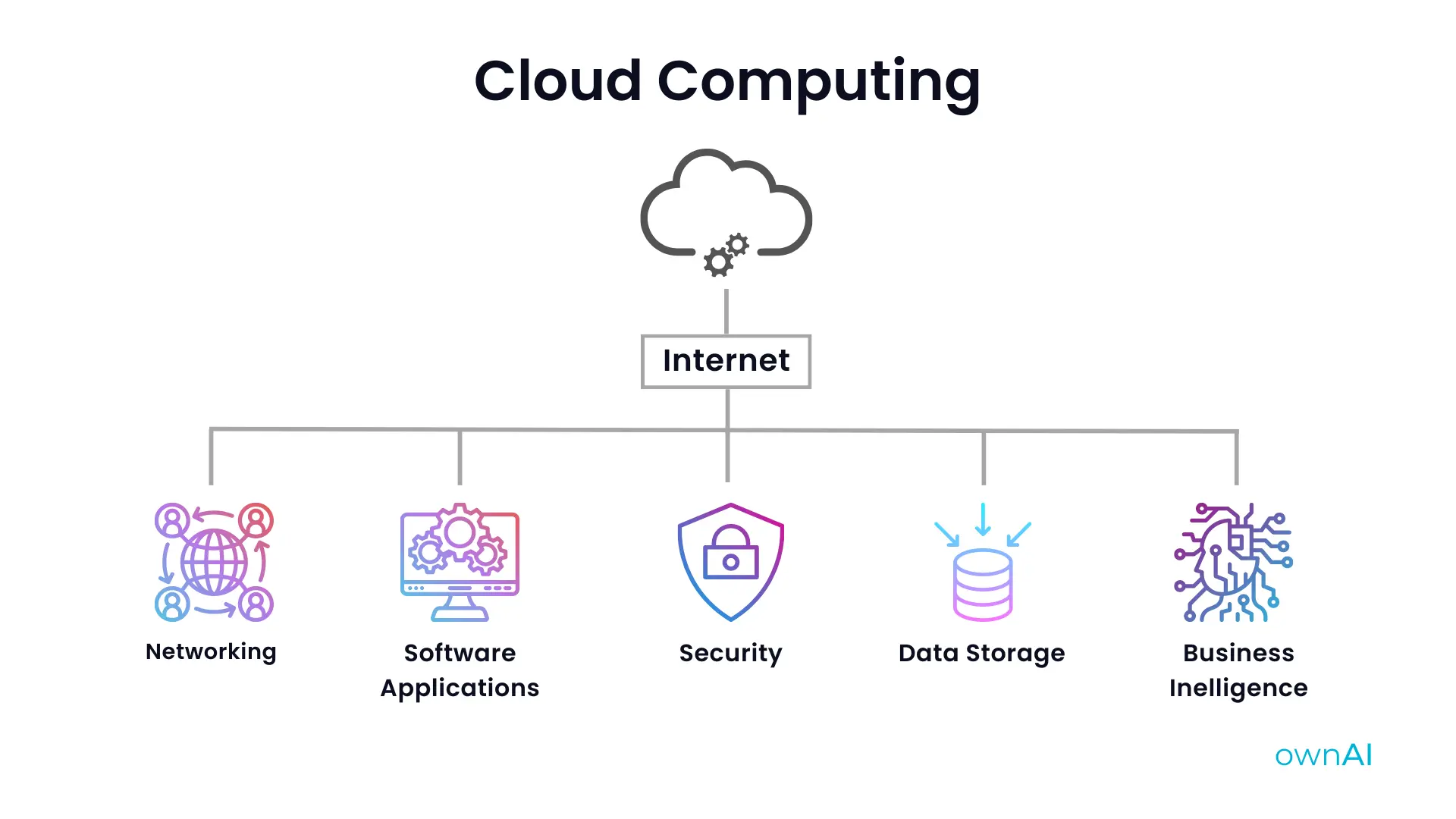
Cloud services refer to any service that operates in a cloud environment. Cloud computing is the practice of accessing and using cloud-based resources including data storage, program, and server resources.
The majority of businesses now use Cloud services because they allow them to save money on infrastructure, maintenance, and the constant monitoring and replacement of hardware. When compared to conventional computing, cloud computing saves time and money.
How Does Cloud Computing Work?
Imagine you have your business software and database stored on a local server. There is an up-front cost associated with the necessary technological and physical infrastructure and ongoing maintenance expenses that are expected to rise.
Companies can avoid these expenses by renting computing resources from cloud computing service providers such as ownAI who offer the same or more advanced infrastructure according to your requirements.
The provider handles routine upkeep and upgrades, leaving your company with just the task of overseeing the hosted application. The cloud service provider also handles the dynamic scaling up or down of these services as needed.
By outsourcing the management of their IT resources, companies can focus on their core competencies while reducing their effort and expenses.
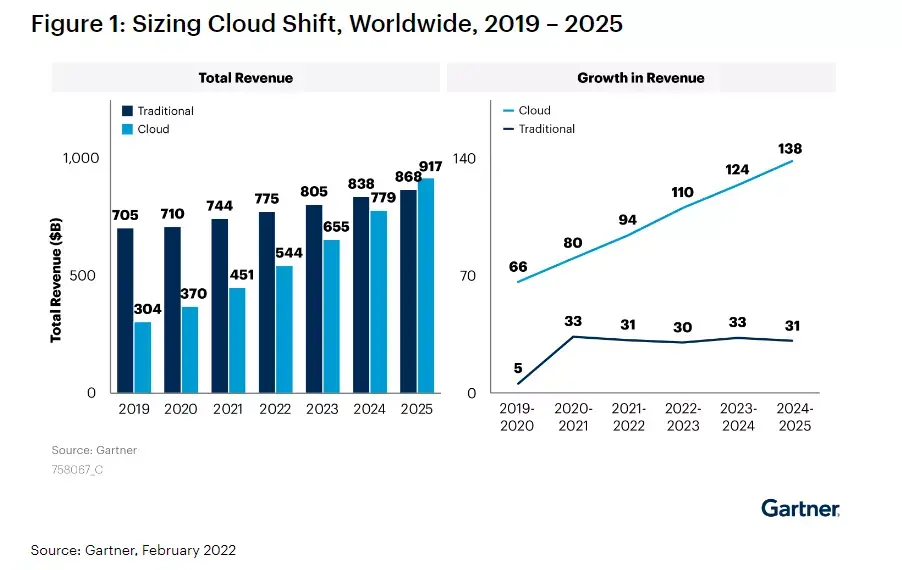
Did you know? According to Gartner, 58.7% of IT spending is still traditional but cloud-based spending will soon outpace it.
Who Uses Cloud Computing?
Everything would be drastically different if the cloud didn't exist. It's gotten so ingrained in our routines that most of us probably utilize it subconsciously. Without the cloud, popular services like Facebook, Twitter, Gmail, and Spotify would not be available.
The commercial world has also been revolutionized by cloud computing. Cloud services are used by millions of businesses across the globe for anything from document generation and backup to social CRM and accounting.
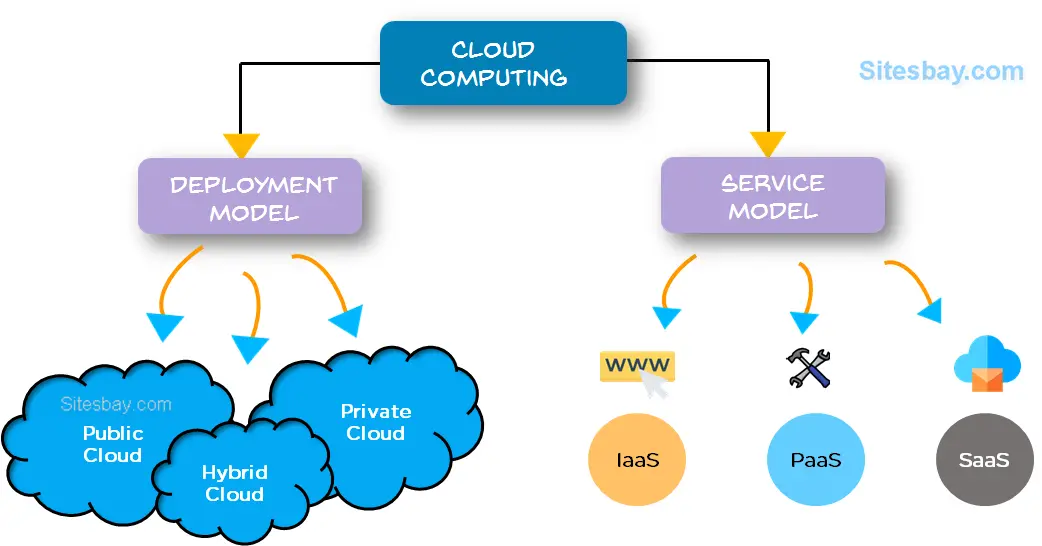
The two most common ways to categorize cloud computing are by the deployment methodology and by the service type offered. We may categorize clouds as public, private, or hybrid depending on the deployment methodology they use.
At the same time, it may be broken down into subcategories such as infrastructure as a service (IaaS), platform as a service (PaaS), and software as a service (SaaS), all of which are a part of the cloud computing paradigm.
Private Cloud
Computing services in a private cloud are provided through a private information technology network and are used only by one company. A private cloud, also known as an internal cloud, an enterprise cloud, or a corporate cloud, is maintained entirely inside an organization and is not open to the public. Self-service, scalability, and flexibility are just some of the advantages of private cloud computing, which also offers more control, security, and customization than a public cloud.
With private clouds, an organization's sensitive data is protected from external parties using internal firewalls and hosting. Private clouds have the advantage of allowing organizations to avoid the expense and effort of managing and maintaining their data centers.
Public Cloud
The term "public cloud" refers to the provision of computing services through the internet by third-party service providers. Unlike with a private cloud, anybody may access and pay for public cloud services. These services might be offered for free or for a fee based on the amount of processing time, storage space, or data transfer required.
Since the public cloud service provider handles system administration, it can help businesses save money that would otherwise be spent on purchasing, maintaining, and managing on-premises infrastructure. They make it simpler for enterprises to increase their storage demands by providing scalable RAM and variable bandwidth.
Hybrid Cloud
The hybrid cloud integrates both private and public cloud solutions. Workloads may be moved between public and private clouds by fluctuating compute and cost needs. A hybrid cloud enables enterprises to withstand peaks in computing and processing demand by expanding their on-premises infrastructure into the public cloud, all while protecting sensitive information from unauthorized access by external data centers.
Instead of investing and maintaining infrastructure that may not be utilized for a lengthy period, a hybrid cloud model allows businesses to pay only for the resources they need within a certain period. To sum up, a hybrid cloud provides the advantages of public cloud computing while mitigating the associated security threats.
Cloud computing may also be broken down into many distinct types, including Infrastructure-as-a-Service, Platform-as-a-Service, and Software-as-a-Service. Let's check out each one individually.
Infrastructure as a Service (IaaS)
IaaS, short for "infrastructure as a service," refers to a specific type of cloud computing where a third-party provider handles the hosting of your servers, data storage, and network connections. Users have full authority over their data, OS, and apps without having to worry about managing the underlying cloud infrastructure.
Hardware, software, servers, and storage are not kept on the user's local machine, but rather by an external provider. The provider not only backs up the user's apps but also hosts them.
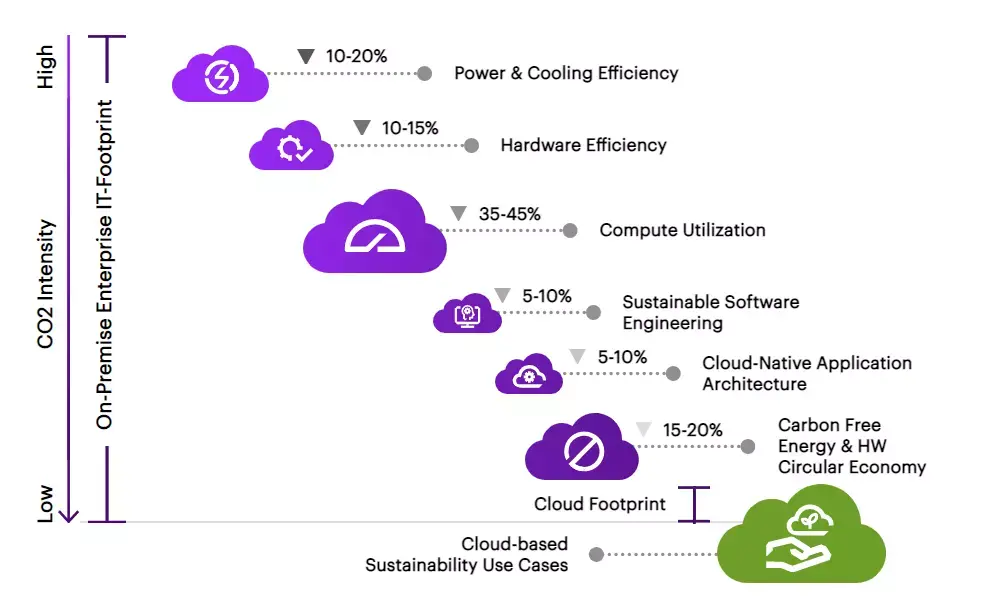
As per the research of technology giant Accenture, Migrating to the cloud reduces carbon emissions by 84%.
By moving to Infrastructure-as-a-Service (IaaS), eco-friendly brands can reduce carbon emissions by up to 84% and energy consumption by up to 64%.
Let’s have a look at the chart made by Accenture:
Platform as a Service (PaaS)
PaaS, which stands for "platform as a service," is a kind of cloud computing that eliminates the need for customers to manually set up and manage their infrastructure to create and execute applications. Users get access to tools for creating cloud-based software. A user subscribes to such a service, pays a vendor on a per-use basis, and then uses an encrypted connection to access the purchased resources.
Users of a PaaS model only need to worry about the apps they have installed; the service provider handles the network, operating systems, servers, and storage. By relieving themselves of the burden of software planning, maintenance, and resource procurement, businesses are free to concentrate on application deployment and administration.
Software as a Service (SaaS)
SaaS, short for "software as a service," provides consumers with on-demand access to a vendor's cloud-hosted application suite. Users' local devices aren't required to run any software in this type of cloud computing. Instead, the apps are hosted on a distant cloud network and accessible through the internet or an application programming interface (API).
All the application software, hardware, middleware, and security are handled by the service provider under the SaaS model. SaaS, often known as "on-demand software" or "hosted software" simplifies maintenance and support for large organizations.
What's So Great About Cloud Computing?
Cloud computing's uptake has been rapid and widespread. Some of the most crucial reasons are as follows:
Fast Implementation
Getting a new application up and operating may be a laborious process that can take months if not years. A cloud-based application, however, may simplify this process. Many programs let you join up and begin using them right away, and even the most comprehensive business applications often live in a matter of days or weeks rather than months or years.
No Initial Costs
With cloud software, the capital investment expenses associated with implementing a new application are drastically reduced or eliminated. Instead, you pay a fixed monthly price, turning a hefty upfront cost into a manageable ongoing spend.
Instant Scalability
When using cloud-based software, you can scale up or down the number of users to meet your current requirements. That way, you only pay for the resources you use, and you never have to worry about not having enough storage space.
Maintenance Free
Cloud apps eliminate the need for monthly patching, updating, and testing that may consume days of your IT team's work. Since everything is taken care of in the cloud, your team will have more time to focus on creating groundbreaking new products and services.
Access Anywhere
Cloud apps are designed to be used from any device, anywhere, and with complete security.
Benefits of Taking Your Business to the Cloud Platform
As a result of the cloud's many advantages, an increasing number of companies are making the switch. Consider these benefits of taking your company to the cloud.
Security
Each year, several computers are misplaced by staff members. Losing sensitive information might be much more of a problem than losing pricey equipment. If these things do occur, you may feel more secure using cloud computing. If you back up your files to the cloud, you may access them from any device, regardless of where you normally do your work. To further reduce the risk of sensitive information falling into the wrong hands, you may remotely erase any misplaced devices.
Flexibility
Because of the scalability of cloud infrastructure, it's a terrific option for enterprises whose bandwidth needs are likely to expand or decrease over time. If you find yourself in need of cutting down, this may also be the case. The scalability afforded by cloud computing may provide firms with a significant competitive edge.
Increased Collaboration
Your team will be more productive and your workflow will run more smoothly if they can access, modify, and share information whenever and wherever they need it. They can make real-time changes and have complete visibility of the team's work thanks to cloud-based workflow and file-sharing tools.
To get work done with cloud computing, all you need is access to the internet. Many cloud services allow you to use any device, not just computers or laptops, to get your work done.
Employers may now provide their staff with more favorable working conditions, allowing them to strike a better work-life balance. They may find greater success and fulfillment as a result.
The greater the extent to which individuals and groups work together on documents, the more vital and reliable document control becomes. Earlier, teams had to rely on file transfers to work together. Since only one person could edit the document at a time, this process was slow and inefficient.
When you make the switch to cloud computing, all of your files will be stored in a centralized location on the cloud, where multiple users will have simultaneous access. This has the potential to significantly improve the efficiency of your daily operations.
Final Thoughts
The IT industry was completely turned upside down by cloud computing. It allows enhanced product development and award-winning customer services.
As we are currently observing a wave of small and medium-sized enterprises (SMEs) moving their core applications to the cloud, we will eventually see the entire organization being driven on the cloud rather than just the enterprise applications. During this period of change, the Hybrid cloud will be an important factor.
The cloud has the potential to revolutionize many aspects of how businesses operate, from the software and hardware they use to the cultures they foster and the tactics they use.
Talk to us if you want to know how much cloud computing costs, we will be very pleased to listen to you and your needs to quote you the most reasonable price in the market today.
Beginning the Process
You may transition your business into the cloud at a speed that fits your organization, since many of your current business software have a cloud capacity, from your sales management to CRM solutions.
The business case is strong since the expenses are predictable, the risk is under control, and there will be immediate improvements in flexibility.
To get started with cloud computing, you just have to take the first move.
Click here to take the first move NOW and take advantage of ownAI’s digital product development services to thrive in your cloud journey.

Let’s discuss about your next AI, Cloud or Digital Transformation.
 AI-Skilled & Agile
 Transparent, Trustworthy &
Vetted team Not tech, but business &
customer first approach





 Turn your idea into MVP in 8-16 weeks